

You’re managing sales on Amazon, running ads on Meta, hosting on Shopify, and billing through Stripe. Acomim takes care of the invoices you send.
But every month, dozens of invoices come back at you — and none of them organize themselves.
Tailride is the platform that handles all of that automatically. Here’s exactly what it does, what it costs, and whether it’s right for your business.
What Is Tailride?
Tailride is an AI-powered invoice automation platform that automatically captures, extracts, and organizes invoices from your email inbox, vendor portals, and bank statements — without forwarding a single email or sharing a single password.
Founded in Luxembourg. Trusted by 25,000+ businesses. 70,000+ invoices processed per month. Fully GDPR-compliant, CASA Tier 2 certified, all data stored in the EU.
The short version: Acomim automates the invoices you send. Tailride automates the invoices you receive. Together — full cycle, zero manual work.
How Much Does It Cost?
All paid plans include browser extension portal retrieval, bank reconciliation, unlimited users, and priority support. Annual billing = 4 months free. First-month credits doubled on monthly plans. Full refund within 3 days.
One-time credit bundles available separately — never expire, no plan upgrade needed. Full details at tailride.so/pricing.
Before Tailride vs After Tailride
This is the practical difference for an e-commerce business using Acomim for outbound invoicing:
Features in Detail
AI Inbox Scanning — Every Invoice, Every Format
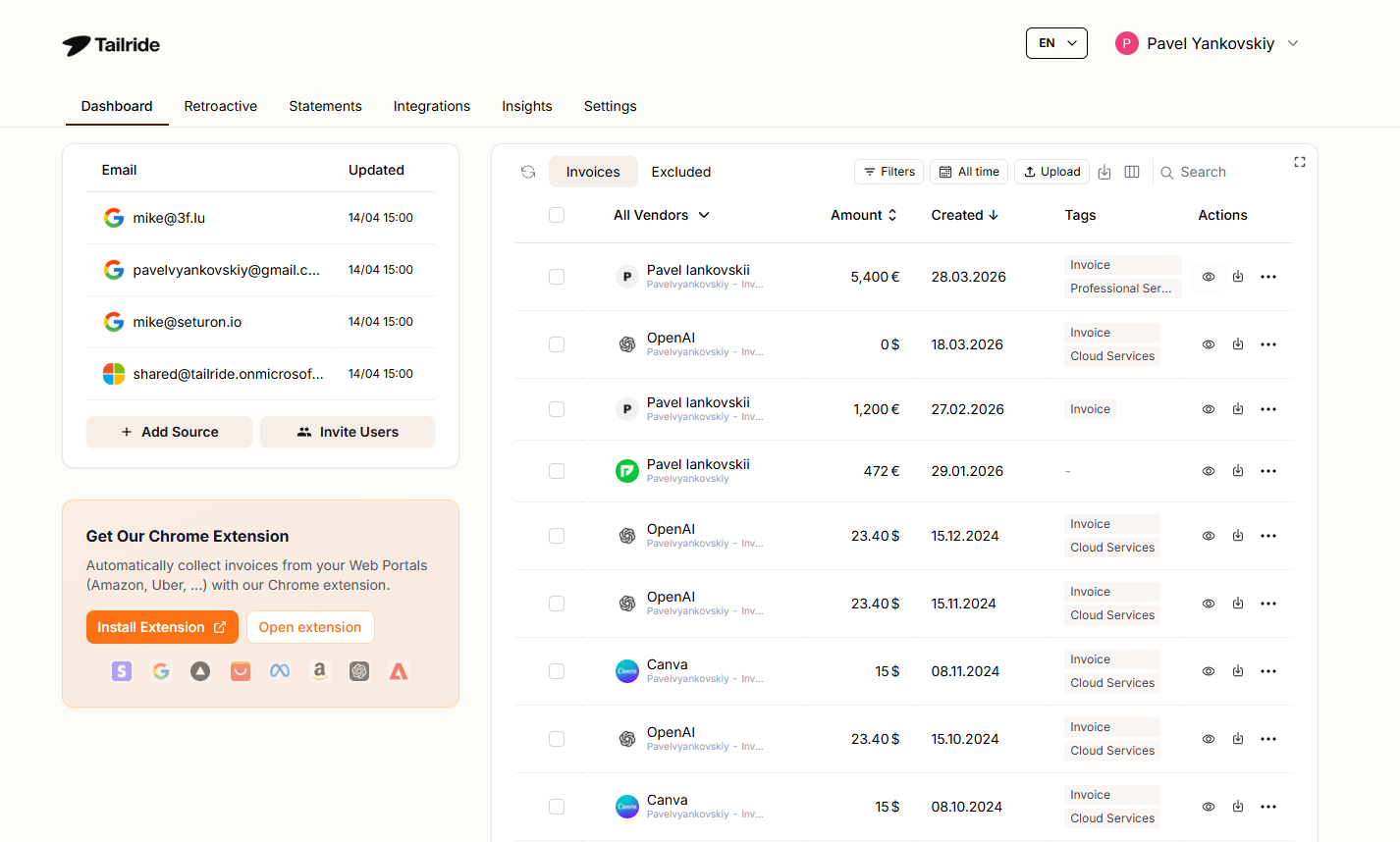
Tailride connects natively to Gmail, Outlook, and all IMAP-compatible email accounts via OAuth. Once connected, it scans every inbox automatically every hour — finding invoices in PDF attachments, image files, inline email content, and links to external documents. Your emails never leave your inbox: no forwarding address, just a direct native connection.
The AI extraction engine is powered by GPT and Gemini, delivers 99.7% accuracy across key fields — amounts, dates, VAT, line items — and supports 50+ languages. Processing takes around 30 seconds per document. Multiple inboxes across team members or business entities can all be connected simultaneously.
Chrome Extension — 20+ Vendor Portals, One Click
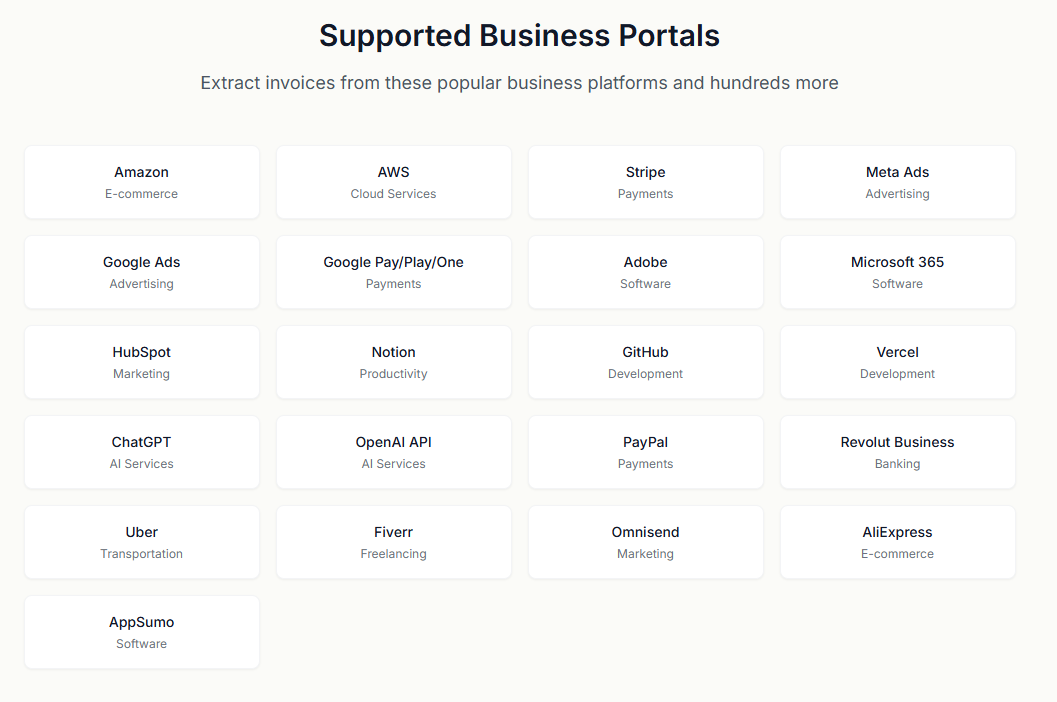
Tailride’s Chrome extension retrieves invoices directly from Amazon, Meta Ads, Shopify, Adobe, Notion, Microsoft, ChatGPT, and 20+ other portals using your existing browser session. You never enter a portal password into Tailride. One click per portal — all invoices in your dashboard. New portals are added regularly and can be requested via the feature board.
For e-commerce businesses juggling platform fees from multiple channels simultaneously, this is the feature that saves the most cumulative time every month.
Retroactive Invoice Scanning — Recover Your Full Invoice History
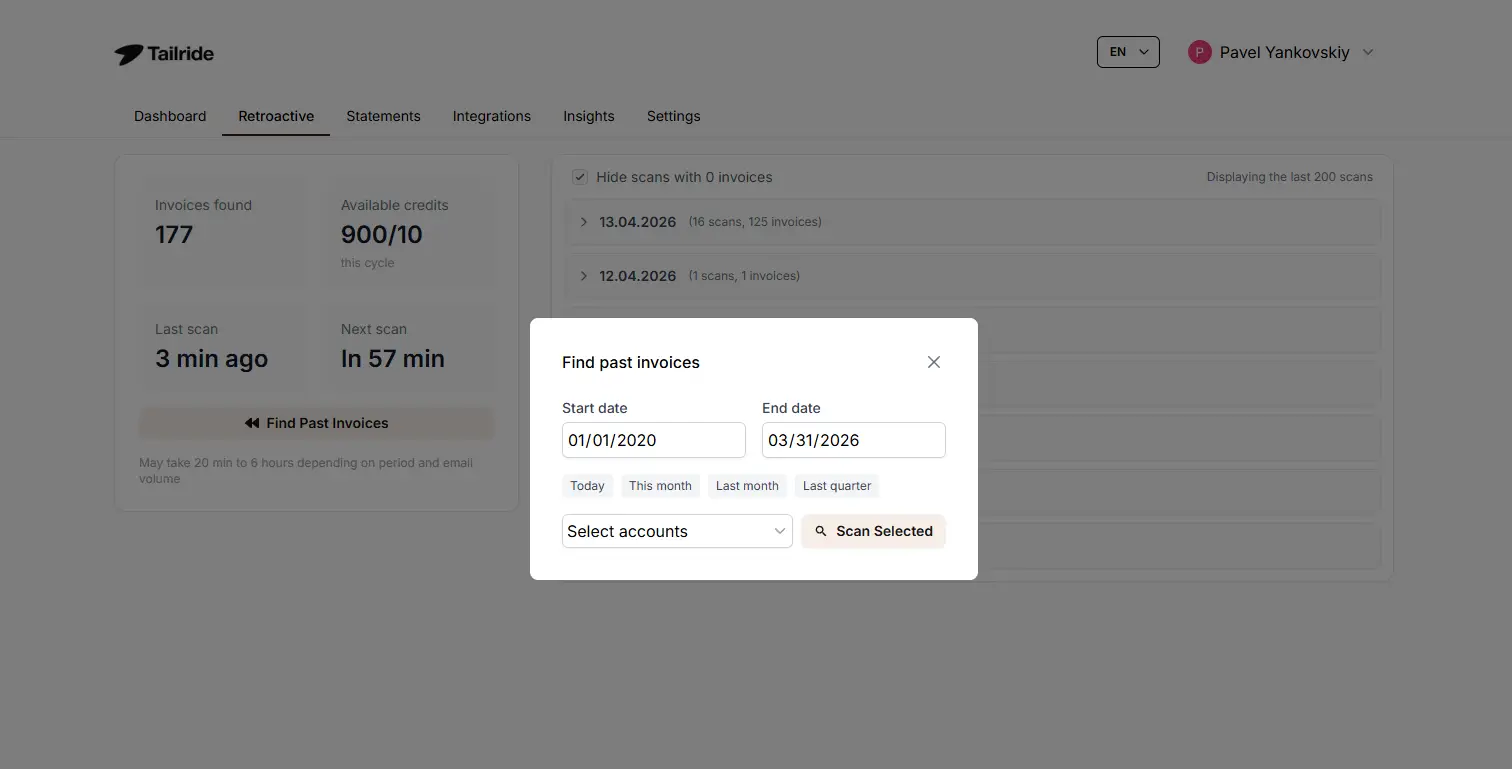
After connecting your inbox, go to the Retroactive tab and click “Find Past Invoices”. Choose your date range — this month, this quarter, this year, all time, or a custom window — and Tailride processes your full invoice history in one automated pass. There is no limit on how far back the scan can go.
Within the first hour of setup, years of invoices that were never properly archived are recovered, structured, and organized automatically.
WhatsApp and Telegram Receipt Bot — Paper Receipts Gone Digital
Employees photograph paper receipts and send them to Tailride’s WhatsApp or Telegram bot. Receipts are extracted and processed automatically in around 30 seconds, appearing in the dashboard alongside all email invoices. Unlimited users can connect at no extra cost.
AI Processing Rules — Set Once, Applied Forever
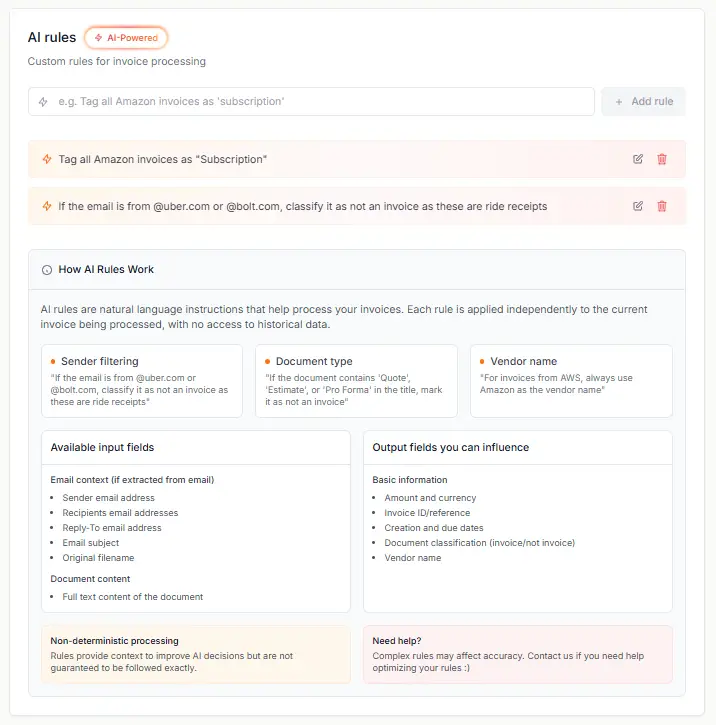
Rules are configured in plain language in under 5 minutes and apply automatically to every future invoice:
Tag by project, cost center, or client
Exclude specific vendors from processing
Assign default tax rates per vendor category
Set custom due dates (e.g. Net 30 on all supplier invoices)
Filter by invoice type (credit notes vs standard invoices)
The result is a dashboard that isn’t just a collection of PDFs — it’s a structured, searchable, pre-categorized record of everything your business receives.
Bank Reconciliation — Any European Bank Format
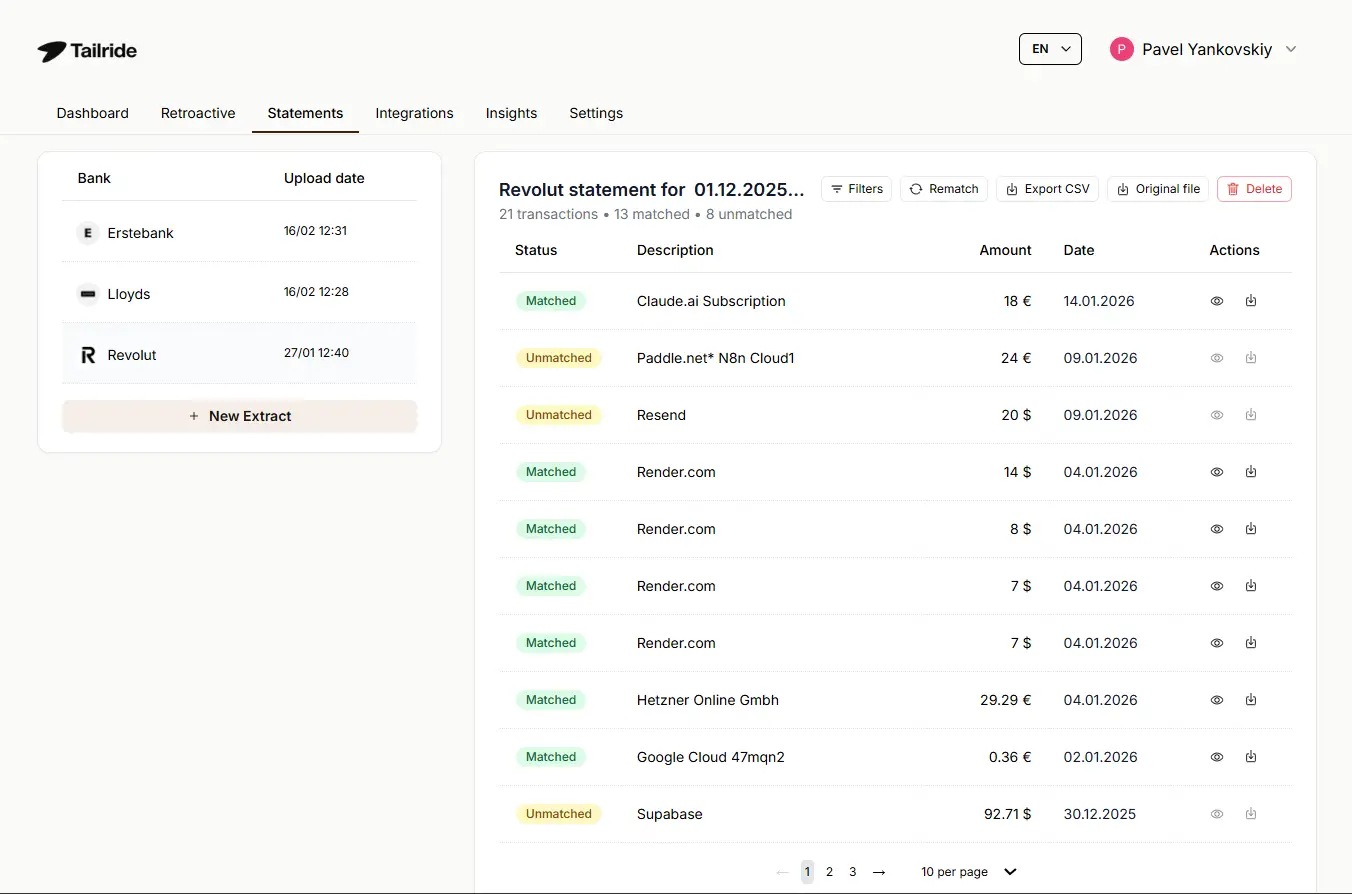
Upload bank statements in PDF, CSV, OFX/QFX, MT940/MT942, or BAI2 — the standard export formats from French and European banks. Tailride matches transactions against extracted invoices automatically with a 95% auto-match rate, flags any missing documents, and produces audit-ready reports. Multi-currency matching fully supported.
Integrations — Export to Your Accounting Stack
QuickBooks Online — bills and expenses with full line-item detail
Xero — fully detailed bill sync
Microsoft Business Central
Google Sheets — invoice data export for custom reporting
Google Drive — organized invoice storage by vendor and date
OneDrive
DATEV — XML export for German-standard accounting
Who It’s Built For
Getting Started
Step 1 — Connect your inbox
OAuth connection to Gmail, Outlook, or IMAP. No password sharing, no forwarding setup.
Step 2 — Run a retroactive scan (optional)
Retroactive tab → “Find Past Invoices” → choose date range. Full history in one pass, no limit on how far back.
Step 3 — Install the Chrome extension
One-click portal retrieval from Amazon, Shopify, Meta Ads, and 20+ other platforms.
Step 4 — Set your AI processing rules
Tag by project, vendor, or cost center. Applied automatically to every future invoice.
From step 1 to fully operational: under 10 minutes.
Frequently Asked Questions
What is Tailride?
An AI invoice automation platform that captures, extracts, and organizes all the invoices you receive — from email, vendor portals, bank statements, and paper receipts — without any manual work.
Which portals does the Chrome extension support?
Amazon, Meta Ads, Adobe, Notion, Microsoft, Shopify, ChatGPT, and 20+ others. New portals are added regularly and can be requested directly.
How does Tailride connect to email without forwarding?
Tailride uses a direct OAuth connection — the same standard used by apps like Google Calendar. It reads your inbox to identify invoices only. Your emails never leave your inbox and no forwarding address is required.
Can I recover old invoices?
Yes. Retroactive tab → “Find Past Invoices” → select your date range. No limit on how far back the scan goes.
Can I connect multiple inboxes for different platforms or team members?
Yes. Paid plans support 2 to unlimited connected email accounts simultaneously. All invoices from all inboxes appear in the same dashboard.
What bank statement formats does Tailride accept?
PDF, CSV, OFX/QFX, MT940/MT942, and BAI2 — all standard exports from French and European banks.
Is Tailride GDPR compliant?
Yes. All data stored in the EU. CASA Tier 2 certified. DPA available on request.
Does Tailride integrate with Pennylane or Abby.fr?
Not natively yet. Both can be requested via the feature board. Google Sheets export provides a clean data feed into either platform.
What is the refund policy?
Full refund within 3 days of payment. No long-term contracts — upgrade or downgrade at any time.
Start for free at tailride.so — no credit card required.